
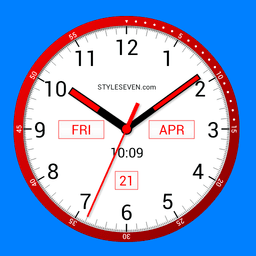
Screenshots
About Color Analog Clock-7
Color Analog Clock-7 is your all-in-one analog clock solution, offering unlimited color variants and display modes to match your style and needs. Whether you want a vibrant timepiece on your home screen or a subtle night mode that protects your battery, this versatile app adapts to how you work and live.
Display time your way across multiple formats. The analog clock shows the current time alongside the date, month, day of the week, and battery charge status. A digital clock display complements the traditional analog face, and you can even enable voice hints—just double-tap to hear the time announced, or set it to speak automatically every 15 minutes. All options support both 12-hour and 24-hour formats in any language.
Choose your perfect display mode. Use Color Analog Clock-7 as a live wallpaper with full customization—adjust the clock size and position directly on your home screen. Set it as an overlay clock that floats above all windows with drag-and-drop positioning and resizing. Add it as an app widget with animated second hands on Android 12 and newer, or run it in full-screen mode with the screen-on option to keep it always visible. During charging, switch to screensaver mode for a polished, hands-free experience.
Protect your device while saving power. Night Clock mode features a calm, battery-efficient design with a black background and dark-gray hands—perfect for late-night viewing without draining your battery. The Always-on Display emulation keeps your clock visible even when the screen sleeps, with manual activation in full-screen mode and brightness control for fine-tuning. Random position changes every minute protect your screen from burn-in damage, a critical feature for devices kept on constantly.
Customize every detail to your preference. Select from five dial font styles, choose a custom image from your gallery, or pick any solid color as your background. The app supports both portrait and landscape orientations across all screen resolutions, from HD to 4K, maintaining crisp quality on any device.
Color Analog Clock-7 combines functionality with flexibility, delivering a sophisticated analog clock experience whether you need a live wallpaper, widget, overlay, or screensaver.
Pros & Cons
Pros
- Multiple display modes including live wallpaper, widget, overlay, and screensaver
- Night Clock mode with battery-efficient design and burn-in protection
- Extensive customization: five font styles, custom images, solid colors, and positioning
- Voice hints let you hear the time announced on demand or automatically every 15 minutes
Cons
- Always-on display mode will significantly drain battery if left running continuously
- Requires permissions to access your photo gallery for custom background images
- Overlay mode floats above all windows, potentially interfering with other app usage
- Limited to Android platform with no iOS or desktop companion version
Related Apps

Microsoft PowerToys
Windows utilities and productivity tools — enhance your workflow with system tools, window management, and file preview features.

Windows Essentials 2012
Email, messaging, photo editing, video creation, and cloud storage—Windows Essentials 2012 includes all the productivity tools you need.

Free Download Manager
Download manager that speeds up transfers, organizes files by type, and syncs with Firefox and Chrome.

HWiNFO
Hardware monitoring for Windows—track CPU temp, GPU load, fan speed, voltage in real time.

TransMac
Read Mac drives and DMG files on Windows. Access APFS/HFS+ storage and create disk images.

TestDisk & PhotoRec
Recover lost files and repair disk partitions — free open-source data recovery tool for Windows.
Latest Articles

Play a free Color Ball Sort Puzzle-style game in your browser (no download)
Oct 6, 2026

Play a free Beach Buggy Racing-style kart racer in your browser (no download)
Oct 6, 2026

Play a free Alto's Adventure-style game in your browser (no download)
Oct 6, 2026

Free online whiteboard like Jamboard: use Quickboard in your browser, no signup
Oct 6, 2026

Free online running pace calculator: splits, race predictor and daily challenge, no download
Oct 6, 2026